
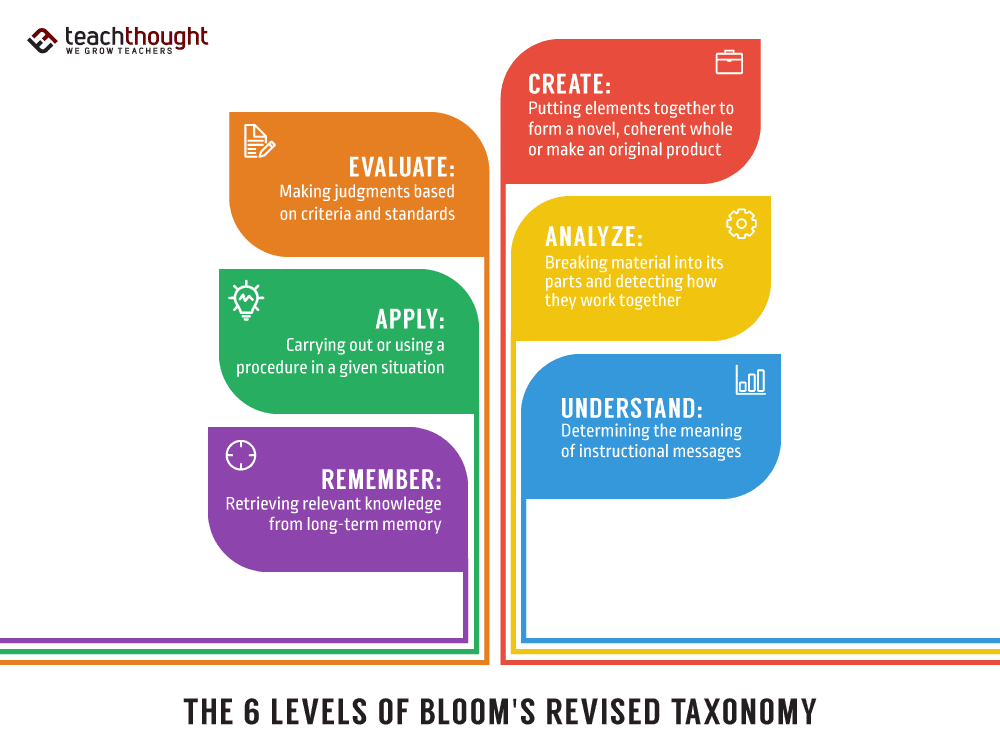

Bloom’s Revised Taxonomy changed the original 1956 framework by updating the level names to verbs, reordering the top levels, and adding a second dimension for types of knowledge. The revision clarifies what students do cognitively and how those actions interact with factual, conceptual, procedural, and metacognitive knowledge.
How Bloom’s Taxonomy Changed
- Nouns to verbs: levels reframed as cognitive actions: Remember, Understand, Apply, Analyze, Evaluate, Create.
- Top-level reorder: Create placed above Evaluate to reflect generative thinking.
- Two dimensions: pair the Cognitive Process with the Knowledge Dimension (Factual, Conceptual, Procedural, Metacognitive).
- Clearer alignment: objectives, instruction, and assessment mapped with the Taxonomy Table.
- Modernized language: Comprehension becomes Understand; Knowledge becomes Remember.
- Planning impact: encourages task verbs and evidence of learning rather than category labels.
Original vs Revised Level Names
| Original (1956) | Revised (2001) |
|---|---|
| Knowledge | Remember |
| Comprehension | Understand |
| Application | Apply |
| Analysis | Analyze |
| Synthesis | Create |
| Evaluation | Evaluate |
What Changed Beyond the Words
The revision introduced the Taxonomy Table: a grid that crosses six cognitive processes with four knowledge types. This helps teachers specify outcomes and assessments more precisely, for example, Analyze x using conceptual knowledge or Apply y using procedural knowledge.
- Knowledge Dimension: Factual, Conceptual, Procedural, Metacognitive.
- Process–knowledge pairing: clarifies task design and evidence quality.
- Assessment implications: verb choice signals expected thinking and scoring focus.
Why It Was Revised
From 1995 to 2000, a team led by Lorin Anderson and David Krathwohl updated Bloom’s Taxonomy to reflect contemporary cognitive science and classroom assessment practice. The goal was to honor the original while making it more actionable for planning, instruction, and evaluation.
Reference: David R. Krathwohl (2002). A Revision of Bloom’s Taxonomy: An Overview. Theory Into Practice, 41(4), 212–218.
Related Reading
TeachThought Staff 2025-12-09 06:15:00
Source link